MyDocSafe now offers Qualified digital signatures
What is a Qualified Digital Signature?
A qualified digital signature (QES) is a digital signature that is compliant with European Union’s so called ESIGN Act / UETA Regulation (No 910/2014) for electronic transactions within the internal European market. In a nutshell, it allows one to verify authorship of a digital signature.
Note that ESIGN Act / UETA requires that no digital signature should be denied legal effect or admissibility as evidence solely on the grounds that it is in an electronic form or that it does not meet the requirements for qualified digital signatures. QES is mostly used when signed documents are to be sumitted to public authorities in the European Union.
The ESIGN Act / UETA standars is gradually being adopted as a blueprint for similar regulation in other countries. Ukraine for example, although not a member of the EU, has domestic legislation that is similar in spirit to ESIGN Act / UETA.
ESIGN Act / UETA is increasingly well known in North America, especially among companies trading across the borders in general and doing business with the EU in particular.
Only a qualified trust service provider (QTSP) can issue qualified digital signature tools and certificates.
QES and MyDocSafe
MyDocSafe now offers qualified digital signatures by connecting to a large number of QTSPs. For an extra small fee, a sender of a document can require that a signee procures a QES. The service is free to the signee (it is only the sender who is charged). To enable the service, the sender needs to select the option when adding a signee:

A QES process requires that a person’s identity document is verified and a unique key issued to the signee which is then used to sign document. Put simply, the power of QES lies in the fact that (1) the key that is used to sign documents is issued by a QTSP after the signee’s identity has been checked and (2) the key is unique and (3) the key is in sole possession of the signee.
The process of signing using QES is the following:
- the signee fills the signature fields and signs with MyDocSafe
- the signee is then asked to sign the document with QES
- if the signee is new to QES, the process will require the signee to have their identity verified first and keys issued
- the signee signs using the unique key (the key is placed on a smartphone’s app which generates unique codes. These codes are then entered into the dialog box requested by the QTSP)
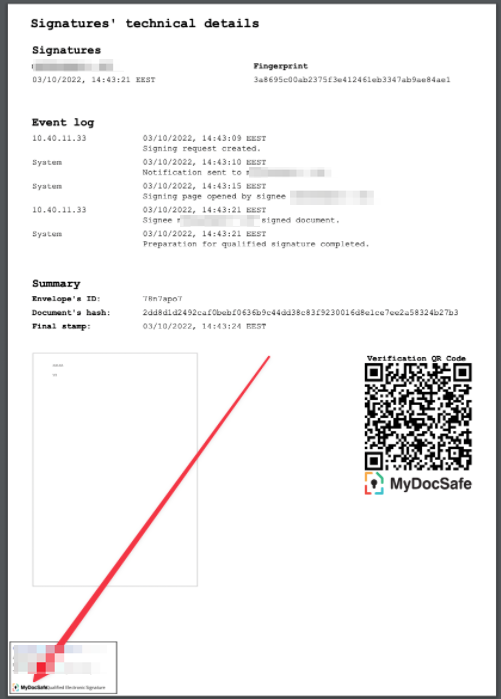
- after signing, the last page receives a ‘stamp’
A document signed through a QES process shows the usual signature certificate that lists the IP address of the signee, the document journey and fingerprints. In addition it also shows a qualified stamp:
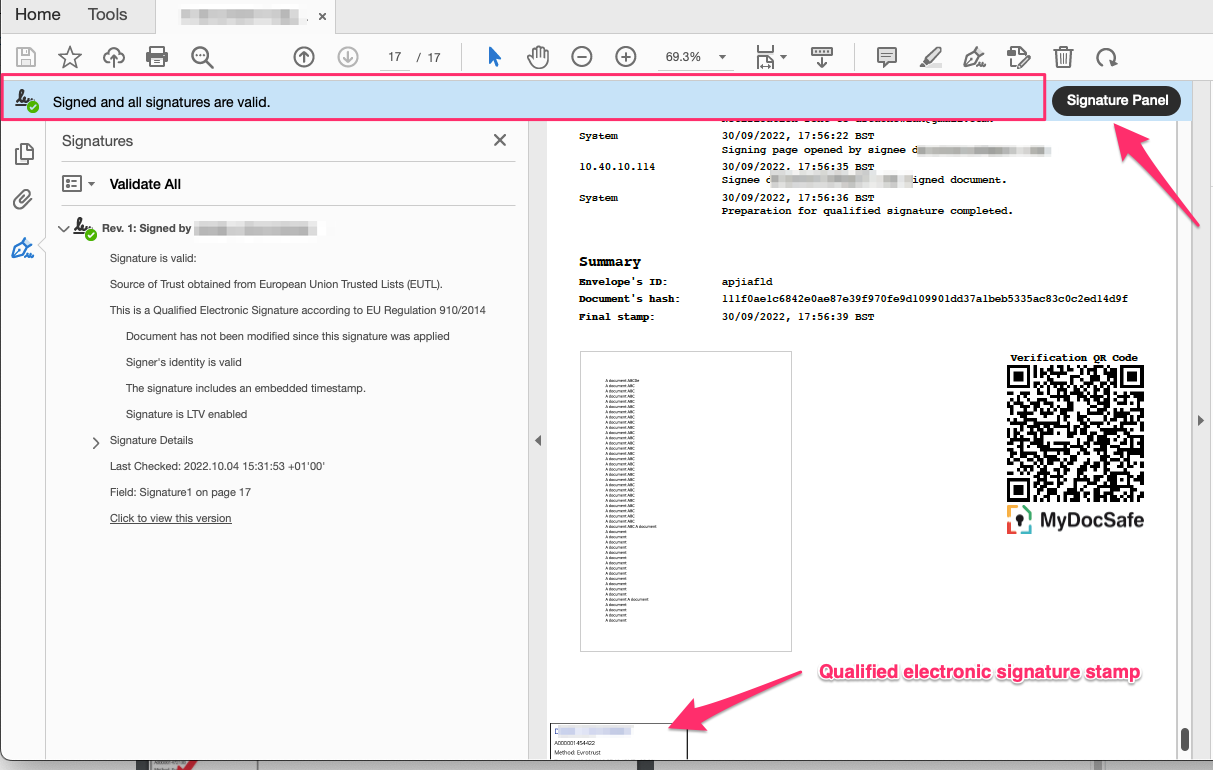
That stamp is also usually ‘visible’ to Adobe Reader which can then confirm who signed the document: