Connect the engagement stages
Bring information collection, file uploads, contracts and signatures into one configurable client onboarding journey.
Explore this workflowUK software comparisons · Verified 19 November 2026
MyDocSafe combines portals, forms, signing and onboarding, with practice-management options for your team. Compare that scope with TaxDome’s practice-wide operations, pipelines, communications and billing, around the systems you plan to keep.
Written by MyDocSafe. Primary sources linked below; features, allowances and prices can change.
Why consider MyDocSafe?
Bring information collection, file uploads, contracts and signatures into one configurable client onboarding journey.
Explore this workflowGive clients an individual portal for document sharing, contracts and future exchanges with your practice.
Explore this workflowMyDocSafe also offers practice management for tasks, time, teams and clients. Choose the scope that fits around the systems you intend to keep.
Explore this workflowBoth products extend beyond document exchange. MyDocSafe combines client workflows with a practice-management offering; TaxDome publishes a broad suite spanning client service and internal operations.
| Your requirement | MyDocSafe | TaxDome |
|---|---|---|
| Overall scope | Evaluate the combined portal, forms, e-signature and onboarding journey. Source | A broad platform spans client onboarding, document collection, workflow and proposals/payments. [T1] |
| Client communication | Portals provide a place for client document exchange and continuing access. Source | Web portal, iOS/Android client app and secure client chats are listed; a fully white-labelled app is a separate offer. [T1] |
| Intake and tax information | Forms and questionnaires collect structured details for client engagements. Source | Tax organisers, intake forms and document request lists gather data and track completion. [T1] |
| Workflow | Configurable client onboarding combines form completion, uploads, contract signing and payments. Source | Customisable processes, task management, dependencies and conditional automation support practice operations. [T1] |
| Signatures and documents | Electronic signing is part of the document workflow; storage and audit allowances depend on plan. Source | The UK page lists unlimited standard e-signatures and document storage, approvals and a PDF editor. Confirm advanced-signature terms separately. [T1] |
| Engagement and revenue | Onboarding describes forms, contracts, electronic signatures and payments together. Source | Proposals, engagement letters, recurring invoices, time tracking and payment-linked document locks are listed. [T1] |
| Internal firm operations | MyDocSafe practice management covers tasks, time, teams and clients. Source | Capacity management, internal chat, an SOP wiki and reporting are part of the published practice-management scope. [T1] |
| Licence sizing | Current MyDocSafe plans are staff-seat based with specified guest and storage allowances. Source | New international customer pricing is active-client-account based with an annual minimum and 20 staff seats; legacy-customer transition rules apply. [T2] |
You want portals, forms, contracts and signing together, with the option to explore MyDocSafe practice management for tasks and time. Your priority is shaping a coherent client journey around the tools your team intends to keep, rather than assuming every existing system must change.
You want to consolidate broader practice operations, including client CRM, pipelines, staff tasks, communications, documents and billing. Its practice-wide scope and included staff seats may be valuable if you are prepared to plan the corresponding operational change.
The client journey
Bring a new client into the practice with a clear information request, engagement agreement and place to return. Connect the client-facing stages to your team’s working process.
Gather the details and supporting files needed to open the engagement. Check the client’s mobile journey and the team’s review process.
Prepare the relevant engagement documents, send for signing and confirm that signed copies are accessible to the right people.
Return to the portal for later exchanges and organise the team’s follow-up. Include task management, time recording and billing requirements in your wider practice-system decision.
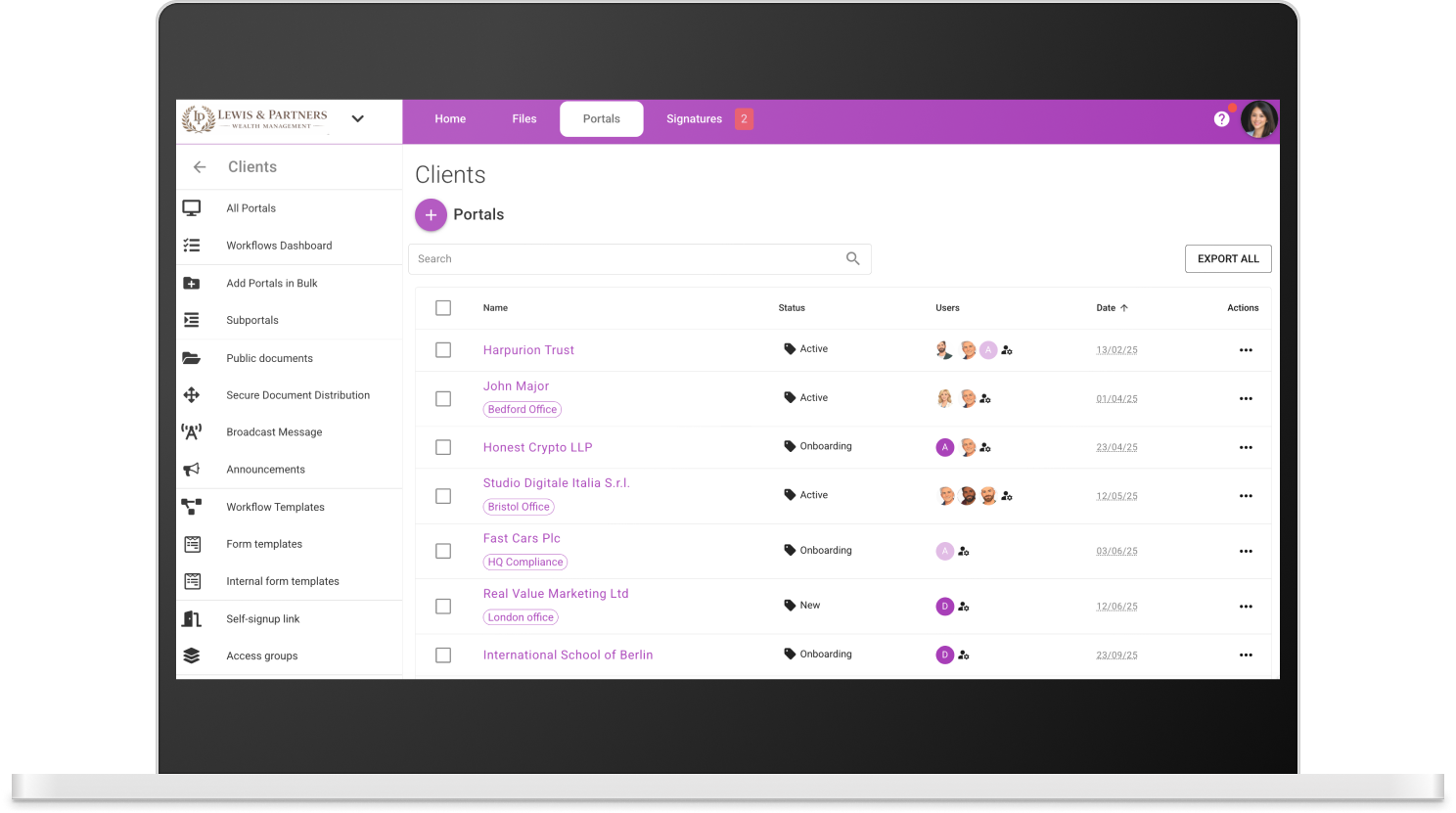
See how MyDocSafe client onboarding combines forms, file uploads, contracts and a client portal. Book a demo with your own documents.
TaxDome’s current UK new-customer model is priced by active client accounts with a 150-client annual minimum and 20 staff seats. The source says annual payment upfront, not month-to-month billing. A small firm should evaluate the minimum even if it serves fewer clients.
This model applies to international firms signing up on or after 2 November 2026, with existing firms moving according to renewal transition rules. Older per-seat headlines are not the current new-customer starting model. Ask TaxDome how your accounts will count: the marketing and help descriptions use different timing language.
Request a current quote including applicable VAT, any AI or white-labelled app add-ons and hands-on onboarding services. Compare both the cost and the practice functions that you would otherwise retain.
Check TaxDome pricing and terms at the source. For MyDocSafe, compare the current plans, allowances and billing options; identity checks, qualified signatures and other add-ons need separate confirmation.
Budget for staff seats, client access, usage units, storage, migration, training and any tools you will retain. Check VAT, renewal terms and cancellation conditions with both vendors. We do not assume switching will save money.
Related context: MyDocSafe for accountancy and bookkeeping client workflows · MTD digital sign-up case study.
No. It covers broad practice operations, including CRM, pipelines, task and capacity management, communications, documents, proposals and billing. A fair alternative evaluation must account for the functions your firm actually uses.
The reviewed current international model applies to sign-ups from 2 November 2026 and is based on active client accounts, with 20 staff seats and an annual client minimum. Existing customers have transition rules, so your renewal situation matters.
The sources distinguish unlimited CRM contacts from active client accounts. Do not substitute address-book size for the billable account count. Confirm the account definitions and measurement period in your own quote and terms.
Yes. MyDocSafe’s practice-management offering covers tasks, time, teams and clients. Compare the specific pipelines, capacity, billing and integration requirements your firm needs before deciding which operational tools to retain or replace.
Verified 19 November 2026 against public primary sources, not a hands-on benchmark or legal assessment. Fit recommendations are MyDocSafe’s editorial judgement. Prices and plan entitlements can change; confirm your requirements in a current quote. Current new-customer terms differ from legacy seat pricing. Confirm active-account counting and advanced-signature terms in your quote. VAT treatment was not stated in the reviewed UK pricing sources.
MyDocSafe evidence: portals, signatures, forms, onboarding and pricing. Sources describe capabilities, not a guarantee of suitability for every legal or regulatory requirement.
Explore all comparisonsSee how MyDocSafe combines portals, information collection, signing and onboarding with the way your practice works.