Save your clicks for profit | MyDocSafe
MyDocSafe is working on speech enabled interface, but until it's there, do save some clicks to improve your profit
Save your clicks for profit
AI will automate everything – but not just yet
We’re not quite at the stage of fully voice-activated, AI-driven computing. For now, we still rely on keyboards, screens, and buttons.
While MyDocSafe — along with many other innovators — is working toward speech-enabled interfaces, today we still depend on the mouse, hand-eye coordination, and sometimes clunky or confusing user experiences. As a result, we often click too much.
Once we learn a pathway from A to B, we tend to repeat it — call it muscle memory. But those extra clicks come at a cost:
-
To your firm, in the form of lost time and productivity
-
To the environment, through unnecessary energy usage
The good news? There’s a better way.
In this short guide, we explore all three aspects:
-
The social cost
-
The business cost
-
And practical ideas to reduce both
Environmental Cost of an Unnecessary Click
⚡️ 1. Energy Use per Click
While a single click seems small, it typically triggers:
-
A request sent over the internet
-
A response from one or more servers (e.g., web hosting, databases, APIs)
-
Rendering in your browser/device
Estimated energy per simple web request:
-
~0.02 to 0.5 Wh (watt-hours), depending on complexity and backend load (Sources: Sustainable Web Design, IEA reports)
That’s equivalent to:
-
Boiling ~0.01 cups of water
-
Running a LED light bulb for 1–10 seconds
🌱 2. CO₂ Emissions per Click
Based on average global energy mix (around 475g CO₂/kWh):
Estimated emissions per click:
-
0.01–0.25g CO₂ per click
Multiply that:
-
20 unnecessary clicks/day = 5g CO₂/day
-
250 working days/year = 1.25kg CO₂/year/person
That may sound small, but:
-
For a team of 100: 125kg CO₂/year
-
That’s equivalent to driving ~320 miles in an average petrol car
-
Or producing 250 plastic bottles
🧩 3. Cumulative Impact at Scale
Now scale that globally:
-
Billions of users online
-
Trillions of unnecessary clicks, refreshes, and reloads
💡 Unoptimized websites, overly complex forms, or redundant processes collectively account for hundreds of thousands of tonnes of CO₂ emissions annually.
✅ Why It Matters for Professionals & Designers
-
Reducing unnecessary clicks = Better UX + Lower emissions
-
More efficient tools reduce cloud processing loads and bandwidth
-
Streamlined workflows = Smaller carbon footprint per task
🎯 Bottom Line
One unnecessary click may emit only a fraction of a gram of CO₂ — but in high-traffic environments or repetitive workflows, it adds up to meaningful environmental waste. Designing for efficiency is not just good UX — it’s climate-conscious design.
Business Cost of Unnecessary Click
1. Time Lost per Click
-
Average time lost per unnecessary click: 2–3 seconds
-
Including mental context switching: up to 5–10 seconds
-
In a workflow with 20 redundant clicks/day:
~3 minutes lost/day/person → ~15 hours/year
2. Wage-Based Cost
Assume:
-
Tax advisor or admin earns £60/hour
-
15 hours/year lost to unnecessary clicks
👉 Cost per employee per year: ~£900
Multiply that across 5 employees:
👉 £4,500/year in lost productivity
3. Opportunity Cost
In billable environments (like accounting/tax):
-
If an advisor bills at £150/hour
-
15 hours lost = £2,250 in missed billable time
Hidden Costs of Click Friction
-
User frustration → Lower engagement
-
Higher training/support overhead (more to explain)
-
Reduced tool adoption
-
Slower onboarding for staff or clients
-
Increased error rate (clicking wrong fields or buttons)
A single unnecessary click may cost just seconds, but across a team and year, it adds up to hundreds or thousands of pounds in wasted time and missed revenue — and degrades the user experience along the way.
How to identify and remove unncessary clicks?
Bookmarks
- Start by making a list of web services you use most often.
- Order it by frequency of use
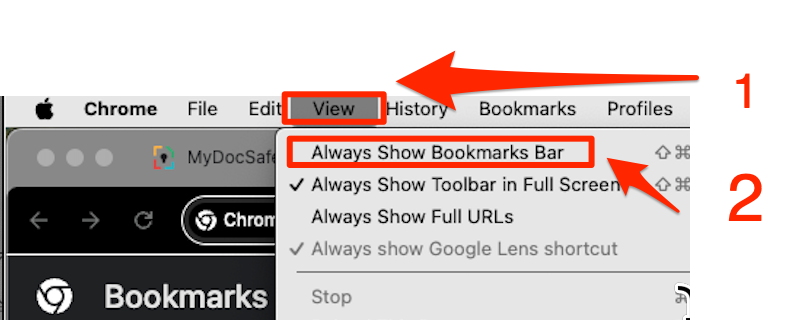
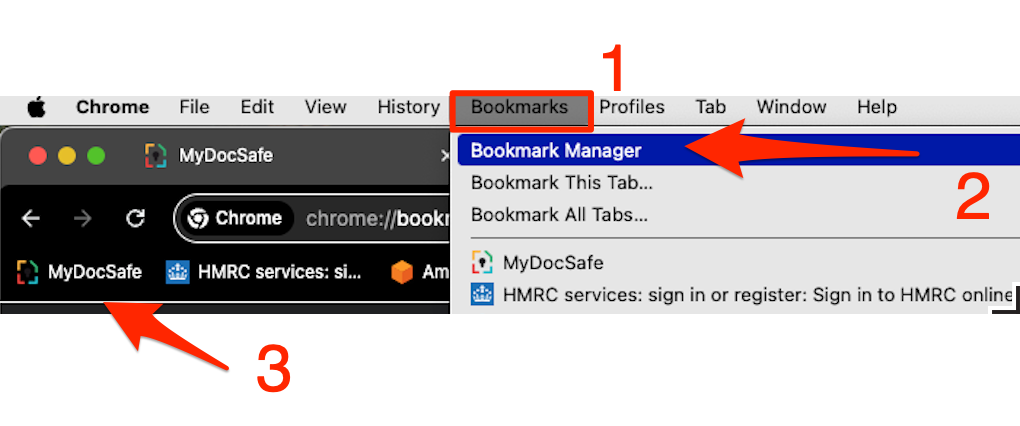
- Expose a bookmark menu in your browser. In Chrome on iOS you can do that through the View / Always Show Bookmarks Bar
- Visit the login pages of your most frequently used services and bookmark them. For example, to bookmark MyDocSafe portal login page go to app.mydocsafe.com or go to the white-labelled address you may have configured (such as ‘portal.mydomain.com’ or ‘mybusiness.mydocsafe.com’)
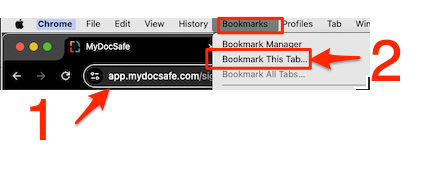
- Organize your bookmarks so that the services that are used most frequently are on top of the list or always visible in the Bookmarks Menu
This is just the beginning
A full audit of your clicks is not the best pastime, but perhaps there is no other way: especially if you feel frustrated or you simply know that “there must be a better way of doing things”. Contact your service providers with questions. It is very likely they might help and give you useful hints to shave off a few seconds here and there. Good luck!